
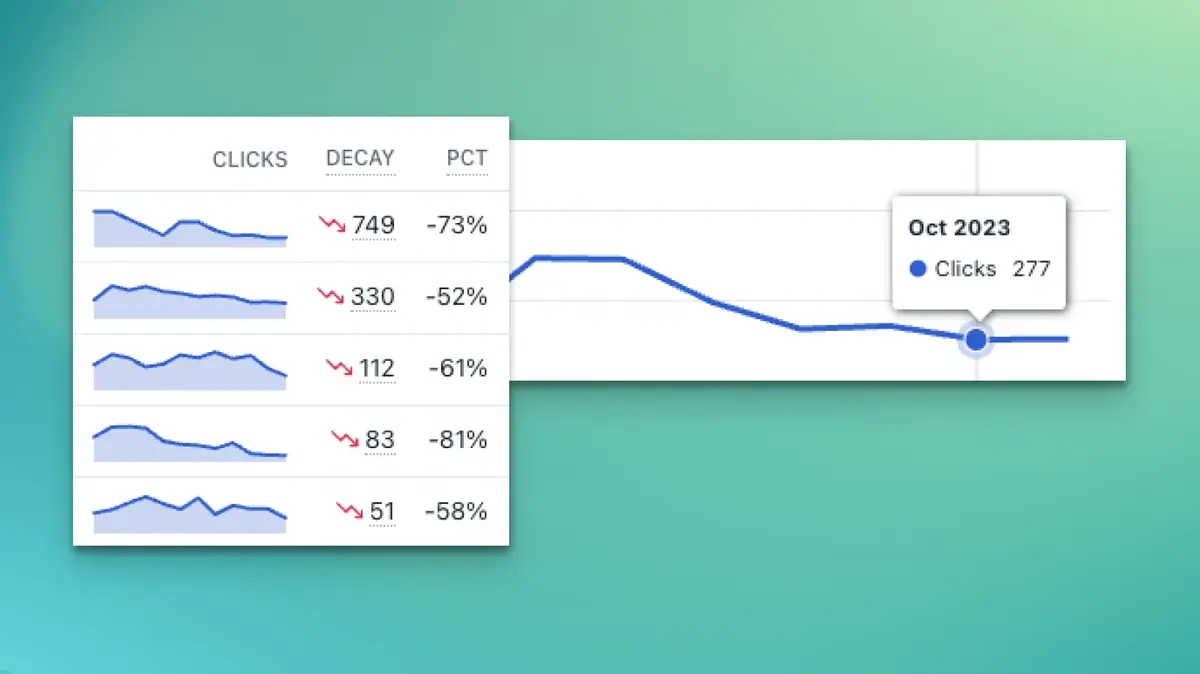
Content decay is the gradual loss of traffic, rankings, and engagement as articles become outdated or competitors publish stronger content. This article explains how to spot early warning signs like falling CTRs and ranking drops, analyze declining pages using SEO tools, and refresh outdated content with updated data, better structure, and improved search intent alignment to recover and protect long-term organic traffic.
Every single minute, a top-performing article somewhere on the web silently takes its first step toward organic irrelevance. It does not happen with a dramatic drop in rankings or a sudden manual penalty notice in your search console dashboard. Instead, it happens like a slow, quiet leak in a tire a few clicks disappear this week, a couple of keyword spots slip next month, and before you know it, a page that once anchored your monthly inbound leads is completely dead. This invisible revenue killer is known as content decay.
If you want to maintain your digital footprint, executing a systematic content decay analysis is no longer a luxury choice; it is a vital survival tactic. The internet is heavily congested with automated text, and major search engine shifts such as the February 2026 Google Core Update are actively rewarding depth, original human experience, and regular upkeep over massive, unmonitored archives. By learning how to recognize the early warning signs of a failing page before it drops out of the top search results, you can proactively protect your traffic pipeline, preserve your domain authority, and keep your brand ahead of the competition here at Memorable Design.
1. The Anatomy of Content Decay
Content decay is the gradual decline in a page's organic traffic, keyword footprints, and user engagement metrics over an extended timeline. Unlike a sharp traffic drop triggered by a technical site issue or a major algorithm update, decay happens naturally as a page ages, market trends evolve, and newer competitor articles enter the search landscape.
When you publish a new article, it typically goes through an initial growth phase where it builds authority, earns internal links, and peaks in visibility. However, without continuous maintenance, every asset eventually enters a stagnation phase before sliding down the charts. Ignoring this natural cycle leaves substantial marketing equity completely untapped while wasting the original time and money spent creating the piece.
2. The Triggers for Content Audit Traffic Loss
Understanding why a once-great article starts losing its grip on search results is the first step toward fixing it. A comprehensive content audit traffic loss review generally reveals that pages do not fail because of a single issue, but rather due to a combination of shifting search habits and competitor improvements.
Core drivers of content obsolescence:
* Stale Data and Outdated Context: Relying on old statistics, defunct tool screenshots, or broken outbound reference links.
* Search Intent Drifts: The underlying reason a user types a query shifts over time, leaving your structural layout misaligned.
* Aggressive Competitor Upgrades: Niche rivals publishing more thorough, deeply researched guides that earn newer backlinks.
* AI Search Interceptions: Modern AI search features providing direct answers on the results page, reducing traditional click-through rates.
The rise of conversational search summaries has introduced a new form of "visibility decay." A page might successfully maintain its exact position at the top of the standard results, but it still suffers severe traffic loss because an interactive summary captures the user's attention at the very top of the screen.
3. Detecting Content Decay Signals Early
To catch a failing asset before it loses its ranking positions completely, you must look past basic monthly traffic views. Relying solely on a broad view of your site's traffic can easily mask deep issues occurring on individual URLs. You need to look closer at your metrics to catch the early content decay signals hiding in your search data.
The absolute earliest indicator of decay is a widening gap between impressions and actual clicks in your search console reports. If a specific page continues to show up frequently in search results but its actual click numbers are slowly drifting downward, your snippet is losing its appeal, or competitors are actively stealing the spotlight.
Diagnostic Metric Matching Framework
To help your team spot these issues during routine reviews, use this diagnostic breakdown to match search performance patterns to their most likely underlying issues.
| Search Impression Trend | Click-Through Rate (CTR) | Keyword Ranking Status | Primary Underlying Issue |
| Steady or Increasing | Noticeably Declining | Stable in Top 3 Positions | SERP feature change or fresh AI summary interception |
| Slowly Dropping | Dropping Proportionally | Gradual Slip (e.g., Position 2 to 6) | Competitor content refresh or loss of topical authority |
| Sharp, Immediate Drop | Flat or Low | Total Ranking Drop Across Terms | Intent shift or major algorithm reassessment |
| Volatile Fluctuations | Highly Inconsistent | Secondary Keyword Losses | Thin subtopics or outdated data signals |
4. Setting Up a Practical Content Decay Analysis
Uncovering these hidden issues across a large website requires a structured, step-by-step approach. Instead of manually inspecting every single URL in your archive, you can use specialized tools like Google Search Console, Ahrefs, or SEOTesting to streamline your review process.
First, pull a performance report covering the last 12 to 14 months and compare it directly against the previous year's data. Filter your view specifically to show pages with declining traffic trends, and sort them by the absolute drop in total clicks. This approach highlights your highest-value pages that are experiencing the largest drops, allowing you to prioritize your optimization work where it will have the biggest financial impact.
Second, look closely at the keyword layer for each declining URL. Identify whether the page is losing traffic across all its terms, or if the drop is tied to a few high-volume phrases. If the losses are widespread, the overall quality or age of the piece is likely pushing it down; if the drop is concentrated on a few specific terms, a competitor has likely built a more targeted answer for those exact queries.
5. Reviving Dying Blog Posts Before They Disappear
Once your analysis highlights your vulnerable URLs, you need an actionable strategy to revive those dying blog posts before they lose their remaining value. Simply changing the publication date or adding a few generic sentences will not fool search systems; you need a thorough, meaningful refresh.
How to effectively execute an asset refresh:
* Run a topical gap analysis to find fresh subtopics that competitors cover but your page misses.
* Strip out old statistics and replace them with the newest available market data points.
* Clean up user experience bottlenecks like broken links, slow loading images, or clunky layouts.
* Rewrite your introductory paragraph to clearly address the current search intent within the first 100 words.
Pay close attention to your on-page elements during the rewrite process. Update your heading structures to include natural, conversational question frameworks, and rewrite your meta descriptions to make them as engaging as possible. Once your updates are live, submit the URL for priority crawling to ensure search systems index your fresh improvements right away.
Preserving Long-Term Digital Value
Maintaining a high-ranking website is not about publishing hundreds of basic, unmonitored posts; it is about protecting and growing the value of the content you have already built. Every old, outdated page on your site acts as a drag on your domain's overall credibility, while a carefully maintained archive signals deep, reliable expertise.
By integrating a systematic content decay analysis into your quarterly marketing routine, you can spot the early warning signs of failing pages and fix them before your traffic drops. Stay proactive, use clear data to guide your updates, and focus on delivering real, human-centric value across your entire site. Protecting your hard-earned traffic is always more efficient than trying to build it back from scratch here at Memorable Design.
Frequently Asked Questions
What exactly is a content decay analysis and why does it matter?
A decay analysis is the process of reviewing your historic website data to find pages that are gradually losing search visibility, keyword positions, and reader engagement. Catching these drops early allows you to refresh the content, keeping it competitive and preventing major traffic drops.
How often should our team run a content audit traffic loss check?
For most standard business blogs and corporate websites, conducting a detailed review twice a year is a great baseline. However, if you operate in fast-moving industries like technology, finance, or healthcare, moving to a quarterly review schedule helps you stay on top of rapid intent shifts and new compliance rules.
How can I spot dying blog posts without using expensive premium SEO tools?
You can easily find these pages for free using Google Search Console. Simply open the Performance report, set your date filter to compare the last six months against the previous six months, click on the Pages tab, and sort by the negative difference in clicks to find your fastest-declining URLs.
Should I delete or refresh pages that show severe content decay signals?
If the topic is still highly relevant to your business and target audience, refreshing the page is almost always the best choice because it leverages the URL's existing backlink value. You should only consider deleting or redirecting a page if the topic is completely outdated or no longer aligns with your services.
How long does it take to see traffic recover after a thorough refresh?
The recovery timeline depends on your site's overall crawling frequency and how extensively you updated the piece. In most cases, you can expect to see positive changes in impressions and keyword positions within an estimated two to six weeks after the fresh optimizations are indexed.
