

Most people choose a website builder without realizing how it affects their brand and SEO. As a mental health content creator, I will explain it. Ruslan Smirnov's journey from brain injury survivor to digital consultant shows why picking the right platform matters. In this WordPress vs Squarespace guide, you'll see which option fits your goals and how website hosting comparison impacts your online presence.
Choosing a Squarespace domain:
Remember when I first dived into creating a Squarespace website? It was all about the drag-and-drop magic for me. I embraced this new adventure like an old friend who needed something simple and quick. I spent plenty of time tinkering with the tools, getting cozy with how everything fit like puzzle pieces, and soon realized how effortlessly I could turn my vision into reality. It felt like a relief to know technical skills were optional and to snag a domain directly on the platform. That made the whole journey as smooth as a jazz tune.
How much does it cost if you use Squarespace or WordPress and what should you expect to pay when choosing between the two?
What Squarespace payments do you need to expect how to save money?
WordPress vs Squarespace: A Friendly Guide to Choosing Your Best Website Builder
Naturally, snagging that complimentary custom domain thrilled me, and it became a big motivator to dive into web hosting. Having the domain bundled in made everything feel straightforward and more pocket-friendly, especially since it was all handled in one spot. It was comforting to set up my site without fretting over extra hassles or additional fees.
Comparing Key Features
Let's break down what makes these platforms tick. Your website needs to work for you, not against you. The right choice saves time, money, and headaches down the road.
Ease of Use
Squarespace wins the simplicity race hands down. You can build a sleek site in hours, not days.
With Squarespace, you start with a complete package. Pick a template, swap in your content, and your site looks professional right away. The editor shows exactly what visitors will see. No tech skills? No problem. Everything lives in one place—editing, hosting, and domain management.
WordPress takes more time to learn. It's like the difference between driving an automatic car and a manual one. WordPress gives you all the parts, but you need to put them together. The dashboard doesn't show how your site looks until you preview it. First-timers often feel lost among all the options.
Mental health content creators often choose Squarespace when starting out. Why? Less tech stress means more time for creating content that helps people. When your brain is already busy crafting important messages, you don't need extra website complications.
Customization Options
WordPress shines brightest when you want total control over every pixel and function.
With WordPress, your site can become almost anything. Want a membership site with courses, forums, and payment systems? WordPress handles it. Need a store with special discounts based on customer history? Done. The platform offers over 59,000 plugins and thousands of themes.
The catch? You'll spend time learning how these pieces work together. Sometimes plugins clash, causing site problems. You might need help from a developer for complex features.
Squarespace offers fewer options but guarantees they work perfectly together. Their templates look stunning out of the box. You can customize colors, fonts, and layouts without touching code. For most small businesses and bloggers, these options cover 90% of what you need.
As Squarespace Circle members know,the platform works best for portfolio sites, blogs, and basic online stores. If your needs stay within these boundaries, you'll save countless hours avoiding WordPress's learning curve.
Design Flexibility
The look of your site speaks volumes before visitors read a single word. Your choice between WordPress and Squarespace shapes how much control you have over this first impression.
Templates and Themes
Squarespace offers about 140 designer-crafted templates that make your site look professional from day one.
Each Squarespace template comes fully built with sample pages, navigation menus, and mobile versions already working. The designs follow current trends and look clean on all devices. You pick one template and stick with it—changing later means starting fresh with your content.
Think of Squarespace templates as buying a beautiful suit that's almost perfect off the rack. You can make small adjustments, but the core style remains.
WordPress boasts thousands of themes ranging from free to premium. This variety means you'll find options for any industry or style preference. Many themes now use block editors similar to Squarespace, making design more visual.
The quality varies widely, though. Free WordPress themes might lack updates or quickly look dated. Premium themes ($40-$200) typically offer better support and features. With WordPress, you can switch themes without losing content, though some formatting adjustments will be needed.
For mental health content creators, finding a theme that creates the right emotional response matters deeply. WordPress offers more niche options for specific counseling or therapy practices.
Mobile Responsiveness
Both platforms create mobile-friendly sites, but they approach it differently.
Every Squarespace template automatically adjusts to look good on phones and tablets. You can't break this feature—it's built in. The mobile view editor lets you hide elements or adjust spacing specifically for small screens. This matters because over 60% of web traffic now comes from mobile devices.
WordPress themes claim to be "responsive," but the reality varies from theme to theme. Older or poorly coded themes might look strange on mobile devices. Premium themes generally handle this better, but you should always test thoroughly.
With WordPress, you gain the ability to create truly different mobile experiences if needed. Some plugins let you build separate mobile designs or even app-like features that Squarespace can't match.
For someone like Ruslan, who built ATaxi.live after recovering from a brain injury, having a platform that automatically handles mobile design removed one major stress point from the website creation process.
SEO Capabilities
Search engines bring free traffic to your site—if they can find and understand it. Let's see how these platforms handle SEO tasks.
Built-in SEO Tools
WordPress gives you complete control over SEO, but requires plugins to unlock its full potential.
The basic WordPress installation handles some SEO elements, such as page titles and content structure. But most users install an SEO plugin like Yoast or Rank Math. These tools add content analysis, XML sitemaps, and meta description editors to every page.
WordPress lets you modify technical SEO elements that Squarespace keeps hidden. You can change URL structures, create custom redirects, and add schema markup for rich search results. This granular control helps with complex SEO strategies.
Squarespace builds essential SEO features right into the platform. Every page has fields for SEO titles, descriptions, and custom URLs. The platform automatically generates sitemaps and adds proper heading structures to content.
What sets Squarespace apart is how it prevents common SEO mistakes. You can't accidentally break your site structure or create duplicate content issues. For beginners, this safety net proves valuable—you won't tank your rankings through technical errors.
When comparing website hosting for SEO, remember that WordPress requires you to choose a quality host, while Squarespace hosting comes bundled. A slow host can hurt WordPress SEO performance regardless of your optimization efforts.
Content Management for SEO
Content remains king for search rankings, and both platforms handle it differently.
WordPress began as a blogging platform, so content management sits at its core. The block editor makes creating structured content with proper headings, lists, and image alt-text simple. Categories and tags help organize content for both users and search engines.
The platform excels at creating content hubs around topics—something search engines love. You can easily cross-link between related posts and create pillar content strategies.
Squarespace offers clean content tools focused on visual impact. While you can create beautiful blog posts, the platform offers fewer options for content organization. Tags exist, but for users who want to learn how to incorporate categories and tags in Squarespace, there are additional considerations compared to other platforms. Category systems aren't as robust as WordPress.
For mental health content creators building topic authority, WordPress offers better tools for creating comprehensive resource sections. However, Squarespace sites often load faster out of the box—a key ranking factor Google now prioritizes.
Both platforms can rank well when used properly. Your content quality and promotion strategy matter more than your choice between WordPress vs Squarespace for most small to medium websites.
E-commerce Features
Selling online? Your platform choice shapes your store's capabilities and growth potential.
Shopping Cart and Payment Options
Squarespace Commerce provides an all-in-one solution that works immediately without extra plugins.
Setting up products in Squarespace takes minutes. Add images, descriptions, variants, and pricing—then you're ready to sell. The platform handles tax calculations, shipping options, and inventory tracking. Payment processing is handled through Stripe and PayPal, with transaction fees of 3% on the Business plan or 0% on Commerce plans.
The checkout experience stays on your domain, creating a seamless customer experience. This matters because each extra step or page redirect can reduce sales by up to 20%.
WordPress requires WooCommerce or another e-commerce plugin to sell products. This adds complexity but brings massive flexibility. WooCommerce powers over 28% of all online stores because it can be customized endlessly.
With WordPress and WooCommerce, you can connect dozens of payment gateways beyond the standard options. Need to accept cryptocurrency, buy-now-pay-later services, or region-specific payment methods? WordPress handles it all.
For small stores selling fewer than 20 products, Squarespace offers a faster setup. For larger stores with complex shipping rules or custom checkout needs, WordPress proves worth the extra setup time.
Product Management and Inventory
The number of products you plan to sell should influence your platform choice.
Squarespace works smoothly for stores with up to about 200 products. The interface remains clean and straightforward. You can create product categories, offer variants like size and color, and set up basic inventory alerts.
The built-in image tools automatically optimize product photos—a huge time-saver. However, bulk editing becomes cumbersome with larger catalogs, and advanced inventory features such as supplier management are missing.
WordPress with WooCommerce scales to thousands of products. The system offers bulk import/export tools, advanced inventory management, and CSV product uploads. You can create complex product types, such as memberships, subscriptions, or digital downloads, with specific access rules.
For growing businesses, WordPress provides room to expand without platform limitations. Stores can add features like wish lists, comparison tools, or complex discount systems as needs evolve.
The best website builder for your store depends on growth plans. Squarespace suits creators selling a modest number of products alongside their content, while WordPress better serves businesses where e-commerce forms the primary focus.
Support and Maintenance
Websites break. When problems arise, having support options makes all the difference between a quick fix and lost business.
Technical Support Access
Squarespace includes direct support with every subscription—a major advantage for non-technical users.
When you hit a roadblock with Squarespace, help is available 24/7 via email support, live chat during business hours, and an extensive knowledge base. Support staff can see your specific site setup, which speeds troubleshooting. Most issues get resolved in hours, not days.
This built-in safety net proves valuable for mental health content creators and small business owners who can't afford downtime or technical frustrations.
WordPress offers community support through forums and documentation, but there is no official help desk. When problems occur, you're responsible for finding solutions or hiring help. Plugin developers provide varying levels of support—some respond within hours, others might take weeks.
For those comfortable with technical details, WordPress communities offer an incredible depth of knowledge. Questions posted in forums usually receive multiple solutions, often from experts who've solved similar problems dozens of times.
The support difference reflects each platform's business model. Squarespace charges monthly fees partly to fund their support team, while WordPress's free core software relies on community assistance.
Updates and Security
Keeping your site secure requires different approaches on each platform.
Squarespace handles all updates, security patches, and server maintenance automatically. You'll never log in to find security warnings or update notifications. This hands-off approach means one less worry for busy site owners.
The platform includes free SSL certificates, DDoS protection, and regular security audits with every plan. Your site benefits from enterprise-level security without requiring any technical knowledge.
WordPress requires you to manage updates for the core software, themes, and plugins. While many updates can happen automatically, major version changes often need manual attention to prevent compatibility issues.
Security responsibility lies with you, the site owner. Installing security plugins, configuring firewalls, and backing up content become regular tasks. Neglecting these maintenance tasks makes WordPress sites vulnerable to hacking.
For someone like Ruslan, who built his consulting business after a brain injury, Squarespace's maintenance-free approach allowed him to focus on content creation rather than technical upkeep. This illustrates why platform choice should align with your technical comfort level and the time you have available for site maintenance.
Cost Comparison
Understanding the true cost of each platform requires looking beyond the advertised prices to include hidden expenses and time investments.
Pricing Structures
Squarespace uses simple, predictable pricing with everything included in monthly or annual plans.
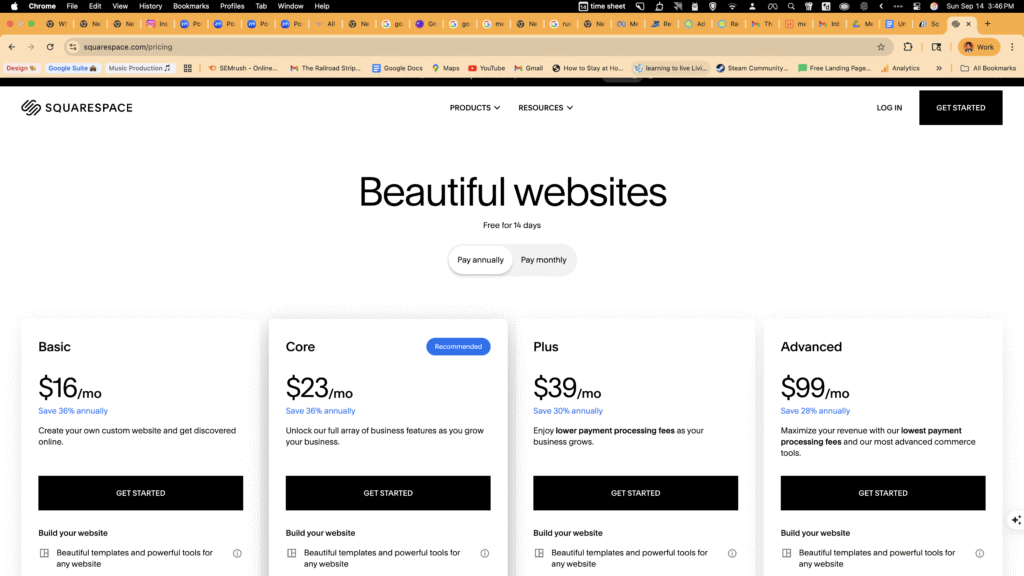
Personal plans start around $16/month (billed annually), including hosting, templates, basic features, and a free domain for the first year. Business plans ($23/month) add e-commerce with transaction fees. Commerce plans ($27-$49/month) eliminate transaction fees and add advanced selling tools.
The total cost remains predictable year after year. No surprises from adding features or growing traffic. This budget certainty helps small businesses plan expenses.
WordPress software costs nothing to download, creating the illusion of a free website. However, you'll need:
- Domain name: $12-15/year
- Hosting: $5-300/month, depending on traffic
- Premium theme: $40-200 (one-time)
- Essential plugins: $0-200/year each
- Developer help: $50-150/hour when needed
A basic WordPress site might cost $150-300 annually, while feature-rich business sites often exceed $1,000/year in combined costs. The price scales with your needs and traffic volume.
The website hosting comparison shows that Squarespace costs more for basic sites but can be cheaper for feature-rich sites once all WordPress extras are factored in.
Time Investment Value
The highest hidden cost might be your time—especially for small business owners wearing multiple hats.
Building a Squarespace site typically takes 5-20 hours from start to launch, depending on content preparation. Ongoing maintenance requires minimal time—perhaps 1-2 hours monthly for content updates and minor adjustments.
WordPress sites demand 20-40 hours for initial setup if you're learning the platform. Ongoing maintenance averages 2-5 hours monthly for updates, backups, and security checks. Complex sites with multiple plugins need more regular attention.
For mental health content creators and busy professionals, time saved might outweigh direct monetary costs. When comparing WordPress vs Squarespace, factor in your hourly value and technical interest level.
Remember that the best website builder saves not just money but precious time you could spend serving clients, creating content, or developing your business strategy.
Making Your Final Choice
After exploring the details, let's bring everything together to help you decide which platform suits your specific situation.
When to Choose WordPress
WordPress makes the most sense when your website needs match its strengths.
Pick WordPress if you need highly specialized functionality like membership sites, learning management systems, or complex e-commerce. The platform excels when you need to build something unique that pre-built solutions can't handle.
WordPress works best when you have technical knowledge or budget for expert help. The learning curve pays off through unlimited customization options and complete ownership of your site's code and data.
Businesses planning significant growth should consider WordPress for its scalability. The platform powers everything from small blogs to major news sites with millions of monthly visitors. You won't outgrow its capabilities.
Content-heavy sites benefit from WordPress's superior organization tools. If you plan to publish hundreds of articles or build comprehensive resource sections, WordPress offers better content management features.
When to Choose Squarespace
Squarespace shines for specific user types and project goals.
Choose Squarespace if design quality matters, but you lack technical skills. The platform helps non-designers create visually impressive sites without touching code or hiring designers.
Squarespace works perfectly for portfolio sites, basic business pages, and blogs where content and images take center stage. The templates emphasize visual storytelling and clean typography.
Pick Squarespace when you need to launch quickly with minimal setup time. The platform lets you create a professional site in days rather than weeks, with predictable results and fewer technical decisions.
Small teams without dedicated tech staff benefit from Squarespace's all-in-one approach. Built-in support and automatic maintenance eliminate the need for ongoing technical expertise.
The best website builder for your project depends on your specific needs, skills, and goals. Neither platform wins outright—they serve different purposes for different users.
Remember that your website should support your mission, not become a project that distracts from it. Choose the platform that lets you focus on creating valuable content and serving your audience rather than wrestling with technical details.
