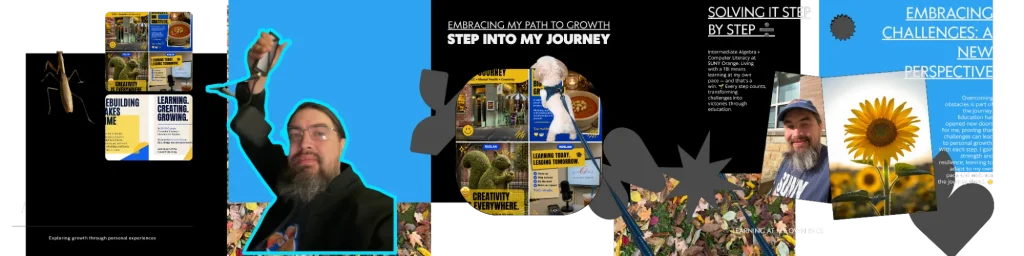
I thought I knew how to use a computer; now I own a digital marketing agency, and I have learned several digital platforms for users, creators, buyers, sellers, or developers. I’m a cybersecurity student at OCCC, and it’s autumn, and I’m thinking back to my psychology and intermediate algebra classes. I asked myself, "What is computer literacy, and what skills does it require?" That was me in the rearview mirror. My Intermediate Algebra and Electronic Literacy class started with a question: how to buy a basic computer, pick macOS or Windows, go online, set up secure Wi-Fi, and tell me what a database is.
Computer literacy is the knowledge and practical skills to use computers and common software effectively, responsibly, and with confidence. This includes things like operating a device, managing files, finding reliable information, creating content, communicating online, and practicing basic security. It also means knowing when you need help.
I’m Ruslan Smirnov, a cybersecurity student at SUNY Orange, a WordPress designer, an SEO strategist, and a TBI survivor. Looking back at my summer psychology class and Intermediate Algebra, I’m discovering how these experiences connect with my work and the person I’m becoming.
I want readers to see the learning behind my work, including the effort to organize ideas, understand a lesson, and explain technology in language another person can follow with confidence.
The Literacy Skills of the Person I See in My Rearview Mirror
Earlier, I was familiar with the tools before I started using the computer for the task. We needed a website. A post had to be written. A brand needed a more distinct voice behind its communication. I learned the platform, and I kept going on.
Now I'm looking closer at the foundations. Platforms serve users, creators, buyers, sellers, and developers. I might be comfortable in one role, but I don’t know everything that goes on behind the screen.
That was me in the rearview mirror, moving forward, sometimes without stopping to examine the basics: communication skills. Returning to class allows me space to ask questions I might have missed previously. Those questions are part of my personal brand journey.
Portfolio Experience Ideas for Basic Computer Literacy
1. Begin with an actual campus fall picture, a brief introduction to how I was learning digital tools, and a button to Explore My WordPress Work. Blue and yellow accents. Nice, readable contrast.
2. Take the rearview mirror idea and make it a short written journey: what I thought I knew, what class made me question, and how I applied the lesson. Leave the actual definition close to the top.
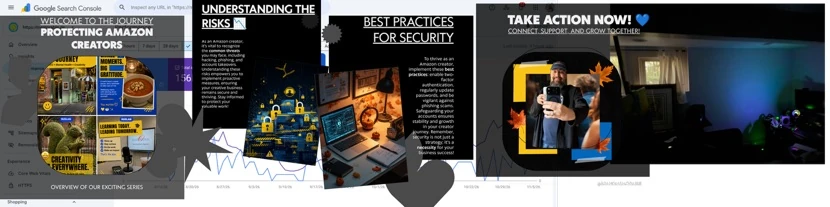
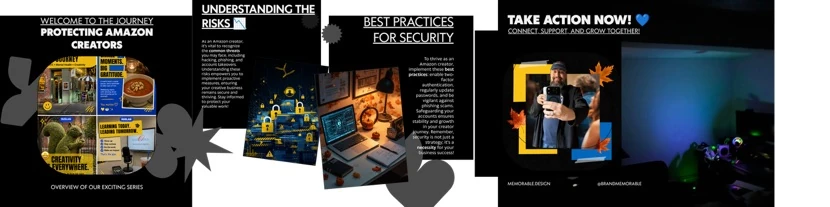
3. Display the Canva presentation in separate, readable slides. The image provided shows creator protection, risk awareness, security practices, and an action slide, but its small body text is difficult to read. Use full-size slide exports when publishing, with a plain-text summary beside them.
4. Connect one lesson to one verified project example: a clearer menu, a better content structure, or easier editing. Explain the problem, Ruslan’s contribution, and the result. Add metrics only where records support them.
5. Add short FAQ answers that resolve hiring concerns. Use headings and readable text; if using accordions, ensure keyboard access and meaningful labels.
6. End with a compact inquiry form requesting the website URL, the main problem, and the desired visitor action. Button: Tell Ruslan About Your Website.
“Psychology gave me a way to think about how people learn and how they process and communicate information. Algebra taught me to slow down, work through each step, and check my answers. I bring those same habits with me to my work as a WordPress designer and founder of Memorable Design.
As a TBI survivor, I know some days I have to go over data analysis, take a break, and try again in my class. I'm learning to respect that pace, starting to discover
Computers, my digital skills. Progress I can be proud of is finishing a slide or learning a difficult computer lesson. As Google stores huge amounts of information on a global network, I started studying literacy, including how to work with databases. 💙💛
Ruslan Smirnov is a student, designer, SEO strategist, and mental health content creator in digital technology. All of this journey is important. Glad to share it with you, computer-literate.
Computer skills I learned: What are you learning this fall?
Follow @brandmemorable and read My Journey Begins at Memorable.design/ruslan-smirnov/ 🍂✨
My Canva presentation helps me connect these ideas visually. Practical instances of using computer literacy skills to communicate and share something meaningful include choosing a clear heading, organizing slides, and combining images with words. 🎨
I’m a TBI survivor, and I know that sometimes learning involves going over a lesson again, taking a break, or finding another way to explain an idea. "I'm learning to respect my own pace but still moving forward."
That’s the story behind my personal brand, Ruslan Smirnov: a student, designer, SEO strategist, and mental health content creator who is still learning. Every step is valuable, including the quiet progress that never makes it into a post. 💙💛
What Computer Literacy Looks Like in My OCCC Classes
My computer literacy class brings everyday decisions into focus. How do I buy a basic computer? Should I choose macOS or Windows? How do I connect to the internet, set up secure Wi-Fi, and understand what a database does?
Alongside Intermediate Algebra, these lessons remind me to examine a problem before choosing an answer. Technology becomes easier to understand when I can explain what I need it to do.
For a student, that might mean opening an assignment, saving the correct file, and uploading it before a deadline. For a business owner, it might mean organizing project materials and controlling who can access them. The setting changes, but clear thinking remains useful.
Choosing a Basic Computer Starts With Your Needs
Before choosing a computer, I would start with the work it needs to support. Writing papers, browsing, joining classes online, creating Canva slides, and building websites may place different demands on a device.
I would make a list of required applications and check their current requirements. Then I would compare memory, storage, screen comfort, battery needs, available connections, and budget. Memory supports active work; storage holds files and applications.
Accessibility belongs in that decision too. Can I read the screen comfortably? Can I use the input tools I need? Will the device support my study routine? A useful purchase begins with those practical questions, rather than a specification that sounds impressive without serving a purpose.
macOS or Windows Depends on the Work
When I compare macOS and Windows, I want to understand which fits my actual tasks. I would check college requirements, software compatibility, equipment I already use, and how comfortable I feel navigating the system.
For cybersecurity coursework, I would ask about any required tools or lab environments before buying. For creative work, I would check the applications and peripherals involved. Choosing an operating system is easier when I have that information.
Computer literacy includes knowing that an operating system manages the environment in which applications run. Learning its settings, file tools, and accessibility options helps me use the device more confidently, whichever system I choose.
Going Online Means Understanding the Connection
Using the internet starts with a connection, but Wi-Fi and the internet are different things. Wi-Fi connects a device to a local wireless network. That network needs a working internet connection to reach online services.
Understanding that difference helps me describe a problem. My computer might connect to the router while a website still fails to load. The difficulty could involve the internet service, browser, or website rather than the wireless connection itself.
I’m learning to notice those details and explain what happened. A clear description makes it easier to follow instructions, ask for support, and avoid changing settings without understanding the problem.
Secure Wi-Fi Is Part of Everyday Computer Literacy
As a business owner and cybersecurity student, I want to understand how the network I use is configured. Basic precautions include changing the router’s default administrator credentials, using a strong Wi-Fi password, and keeping router software updated.
The FTC recommends WPA3 Personal or WPA2 Personal encryption and explains why older WEP and WPA options should be replaced. A guest network can also help separate visitor access from the network used for everyday work.
These habits reduce avoidable risks. They also remind me to check instructions for the specific router and understand what a setting changes before applying it. Responsible technology use includes careful decisions about the connection behind the screen.
What Is a Database in Simple English?
A database is an organized collection of information that can be stored, searched, and updated. Database software helps people and applications manage that information. A relational database commonly organizes information into tables containing rows and columns.
Imagine a small business keeping customer records. One field might contain a customer’s name, another an email address, and another an order reference. Organized records make it possible to find information and connect related details.
Learning this gives me a clearer way to think about digital systems. A website displays information, but there is also work involved in storing, retrieving, and managing the information that supports the experience.
What Google Helps Me Understand About Organized Information
Google Search gives me another example. Google describes its search index as a large database containing information it has analyzed from web pages. Crawling finds content, indexing processes it, and serving results helps answer a search query.
That connects directly with my SEO work. Publishing a page is only one part of making information useful. I also need to consider what the page explains, how its headings are organized, and whether visitors can find related information.
Studying databases helps me ask better questions about structure. Studying SEO keeps me focused on the person searching. Together, they encourage me to create content with a clear purpose.
Looking Back at Summer Psychology and Intermediate Algebra
My summer psychology class encouraged me to think about how people learn, interpret information, and respond to an experience. That curiosity follows me into design. I want to understand what someone needs when they arrive on a website or open a presentation.
Intermediate Algebra gives me another kind of practice: slowing down, identifying the problem, following a method, and reviewing the answer. Sometimes I need to return to an earlier step before the next one makes sense.
I bring those habits into website work. A confusing menu or unclear service description deserves careful examination. I want to identify the obstacle, make a thoughtful change, and check whether the experience becomes easier to understand.
My Canva Presentation Makes the Learning Visible
My Canva presentation connects this classroom learning with my creative work. It brings together ideas about protecting creators, understanding risks, following security practices, and taking action. Those topics give me a way to explain why everyday digital decisions matter.
Making the slides also requires practical computer literacy. I need to organize information, choose images, write headings, and decide what belongs on each slide. Then I need to review whether someone else can follow the message.
A slide can look finished before the explanation is clear. Reviewing it helps me see where I have crowded the page or assumed too much knowledge. That is useful practice for both a classroom presentation and a WordPress website.
Learning at My Own Pace as a TBI Survivor
As a TBI survivor, I know some days I have to go over data analysis again, take a break, and try another time. I’m learning to respect that pace while continuing to participate in class and build my skills.
Progress I can be proud of might be finishing a slide, understanding a database example, or learning a difficult computer lesson. Those moments deserve a place in my story because they show the work behind the finished presentation.
I’m starting to discover that confidence can grow through repeated practice. I do not have to hide the questions or the pauses. They are part of how I learn and communicate, and part of the experience I bring to Memorable Design.
How These Lessons Shape My WordPress Portfolio
My WordPress developer portfolio should help you understand how I approach a problem. I want each project to explain what the business needed, what I contributed, and why particular content or design decisions mattered.
The same thinking applies to an FAQ. A visitor might want to know how a redesign begins, whether SEO is included, or how they will update content afterward. Clear answers help us begin a more useful conversation.
Through Memorable Design, I connect SEO, website design, and brand storytelling. My studies give me additional questions to bring to that work. If you are reviewing your own website, begin with this: can a new visitor understand your service and find the next step?
Frequently Asked Questions
What skills does computer literacy require?
Core skills include operating a computer, managing files, using everyday applications, evaluating online information, communicating clearly, and following basic security practices. Troubleshooting and knowing when to ask for help matter too. More specialized skills develop according to your studies, work, and interests.
Do I need coding skills to be computer literate?
No. You can use documents, spreadsheets, presentations, email, and online services without writing code. Programming is a separate skill you may choose to develop. Computer literacy provides practical foundations for using technology and learning more advanced topics when you need them.
Is a spreadsheet the same as a database?
A spreadsheet can store and analyze information, and a small list may work well there. A database system is designed to handle ordered records and to provide relationships between them. The right tool will depend on the information, the task, and the people involved.
How can I use Canva to practice computer literacy?
My presentation preparation involves editing the content, sorting out digital materials, arranging information, and checking the result. It gives me a practical task where I can use computer skills and communication together. Completing a slide gives me something visual to look back on that shows progress.
Can SEO be added in a WordPress project?
Yes. As we plan the website, we can discuss audience questions, page structure, headings, and internal links. The work should fit your business objectives and the state of the existing site. A conversation about the project before implementation helps establish priorities and scope.
Describe your website and what skills are in it. Portfolio.
This fall, computer literacy has become a personal question of how I learn, create, and use technology responsibly. It gives me something to think about when I go back to my work psychology, algebra, Canva, and my cybersecurity studies.
If your website needs clearer content, a more useful structure, or a stronger connection with your audience, tell me about it. Share your website address, describe the main difficulty, and explain what you want visitors to do.
Let’s begin with a clear question and build from there.
Tell Ruslan About Your Website | Explore Memorable Design
Follow @brandmemorable for my OCCC journey, creative work, and everyday progress. Still rebuilding, still learning. Every step is a blessing. 💙💛
What Computer Literacy Means In Daily Life
When you look at ordinary activities, computer literacy is easier to understand. You download an assignment, save it in the correct folder, edit it, and upload the correct version. You receive a message and verify that the sender and the request are valid. You join an online meeting and tweak your microphone so people can hear you.
Each task involves more than just recognizing an icon. That is, understanding what you want to do, picking the right tool for the job, and then checking whether it worked. “Confidence develops when you can repeat that process and recover if something doesn't go right.
It makes a difference at home, at work, and at school. If you can organize your information and explain a problem well enough to get help, technology is more useful. Part of learning how the system works is asking for help.
What Skills Does Computer Literacy Require?
Using Devices and Operating Systems
Start with the device in front of you. Learn how to sign in, open applications, adjust settings, connect necessary equipment, and shut down properly. Understand the basic difference between hardware, which is physical equipment, and software, which provides instructions and tools.
Accessibility settings belong here too. Text size, keyboard options, voice input, and audio controls can make everyday tasks easier. Northstar’s basic computer skills resources include device operation, storage, software updates, and accessibility adjustments.
Organizing Files and Folders
File management means saving work where you can find it again. Give documents clear names, organize folders around a useful purpose, and recognize common file types. Know the difference between a file stored on your device and one stored through a cloud service.
Imagine sending a website designer five files named “final.” A simple naming system helps everyone identify the right material. The same habit helps a student submit the intended assignment and helps a business owner keep website content organized.
Finding and Evaluating Information
Searching well starts with a clear question. Use specific words, review the source, and check whether the information fits your situation. A search result can introduce a topic, but the page behind it still needs your attention.
When I think about SEO, this is the reader I want to serve: someone trying to understand something or make a decision. Useful content answers the question directly and provides enough context to help that person decide what to do next.
Creating Content and Communicating Online
Everyday computer skills include writing a document, formatting a heading, working with a simple spreadsheet, and preparing a presentation. Email, shared documents, and video meetings also require clear communication and attention to who can access the information.
For a website owner, these skills support practical independence. You should understand where your content lives, how changes are reviewed, and who to contact when you need help. A good project conversation makes those responsibilities clear from the beginning.
Practicing Basic Online Security
Computer literacy includes habits that reduce avoidable risks. CISA recommends recognizing and reporting phishing, using strong passwords, enabling multifactor authentication, and updating software. [2] These are useful starting points for students and small business owners.
For a business website, access and maintenance deserve a specific conversation. Decide who needs an account, who manages updates, and how important information is backed up. Security is ongoing work, and the right arrangements depend on the systems and people involved.
Troubleshooting and Learning New Tools
Troubleshooting starts with describing what happened. What were you trying to do? What appeared on the screen? Does the problem affect one application or several? Recording an error message can make a support request much clearer.
You do not need every answer immediately. Being computer literate includes knowing how to look for reliable instructions, try an appropriate basic check, and recognize when a problem needs experienced help. That approach makes unfamiliar tools less overwhelming.
What My Psychology Class Brings to Website Design
Thinking back to summer psychology reminds me to stay curious about people. When someone visits a website, they bring expectations, questions, and different levels of comfort with technology. My job as a designer is to pay attention to those needs.
I can use that curiosity when reviewing a homepage. Is the service explained clearly? Can a visitor find the next step? Does the language assume knowledge the reader may not have? These questions help me examine a design from the visitor’s point of view.
Studying psychology does not make me a psychologist. It gives me another reason to ask thoughtful questions about communication. For my portfolio, I want to explain the thinking behind a project so visitors can understand how the design supports the people using it.
What Intermediate Algebra Teaches Me About Solving Problems
Intermediate Algebra gives me practice working through a problem one step at a time. I need to understand what is being asked, choose a method, and check whether the answer makes sense. A small mistake can send the next step in the wrong direction.
I see a useful connection with website work. If visitors cannot find a service, I need to examine the menu, page structure, wording, and links. If a form is difficult to complete, I need to look at its fields and instructions.
That is the attitude I want to bring to a WordPress project: define the problem clearly, work through the parts, and review the outcome. The process gives a client something concrete to discuss instead of relying only on whether a page looks attractive.
How Computer Literacy Connects With My Cybersecurity Studies
As a cybersecurity student at OCCC, I’m building on the foundations of everyday technology use. Understanding accounts, software, files, and networks gives me a starting point for learning how digital systems can be protected.
It also encourages me to take ordinary questions seriously. Who should have access? Where is information stored? What happens when someone leaves a team? Those questions belong in responsible conversations about how a business uses technology.
My student journey is part of my personal brand because learning continues alongside professional work. I want to describe that journey honestly, share what I am exploring, and keep a clear distinction between the services I provide and the specialist expertise a particular situation may require.
Bringing These Lessons Into a WordPress Portfolio
A WordPress developer portfolio should help you understand how someone works and approaches WordPress website design, from organizing content to creating user-friendly website experiences. Finished screenshots matter, but they become more useful when they sit beside an explanation of the original problem, the developer’s contribution, and the decisions made.
Through Memorable Design, I want my portfolio to connect visual work with clear reasoning. A visitor should be able to see what a project needed, how its content was organized, and how the finished website helps someone take action.
That approach also shapes an FAQ. A useful answer should resolve a real concern before a prospective client gets in touch. It might explain how content updates work, what information helps a redesign begin, or how SEO planning fits into the project.
If you are exploring your next website, start by identifying the task you want visitors to complete. That gives us a practical foundation for discussing your project.
Frequently Asked Questions About Computer Literacy and My Work
What is an example of computer literacy?
A practical example is downloading a document, saving it in an organized folder, editing it, and sending the correct version to the intended person. The task combines software use, file management, and communication. Other examples include creating a spreadsheet, adjusting device settings, and checking information before sharing it.
Is computer literacy the same as coding?
No. Coding involves writing instructions for software. Computer literacy covers the everyday skills needed to use computers and common applications effectively. A person can manage files, create presentations, and communicate online without writing code. Coding can become a further area of study as interests and responsibilities develop.
How is computer literacy different from digital literacy?
The terms overlap, and organizations may define them differently. Computer literacy often emphasizes practical computer and software use. Digital literacy commonly includes a broader range of activities, such as evaluating online information and participating responsibly in digital spaces. For a learner, developing both practical skills and sound judgment is useful.
Why does computer literacy matter to a business owner?
It helps you manage documents, communicate with customers, understand your tools, and work more effectively with service providers. For your website, it can help you ask clearer questions about editing, access, maintenance, and reporting. You can make informed decisions while bringing in specialist help where the work requires it.
How do my OCCC classes influence my approach?
Psychology encourages my curiosity about people. Intermediate Algebra gives me practice solving problems step by step. Computer literacy connects everyday skills with the digital tools I use. My cybersecurity studies add further questions about responsible technology use. Together, these experiences give me useful ideas to examine in my creative work.
Can SEO be considered when planning a WordPress website?
Yes. We can discuss the questions your audience asks, the services each page needs to explain, and how visitors will move through the site. That planning can guide headings, content, and internal links. The scope should reflect your business goals and existing website, with expectations discussed before work begins.
What should I share when asking about a project?
Send your website address if you have one, describe your business, and explain the main difficulty you want to solve. Tell me what you want a visitor to do after arriving. If you have a preferred launch date or budget range, include those details so we can discuss a realistic scope.
Let’s Make Your Website Easier to Understand and Use
My autumn reflection began with a question about computer literacy. It brought me back to something practical: technology serves us better when we understand its purpose and can use it with confidence. That idea connects my classes, my personal growth, and my work through Memorable Design.
I’m Ruslan Smirnov, and I want the experience of visiting my portfolio to feel clear and useful. You should leave knowing more about how I think, what I am learning, and how we could approach a website project together.
If your WordPress website needs clearer content, a more useful structure, or a fresh discussion about its direction, tell me where you are now. Share the page that concerns you most and explain what you want it to accomplish. We can start the conversation with a specific problem and a meaningful goal.
Tell Ruslan About Your Website
Explore My Portfolio
Follow @brandmemorable for my OCCC journey, creative work, and personal reflections.
Source notes
Federal Trade Commission, How to Secure Your Home Wi-Fi Network.
Oracle, What Is a Database
Google Search Central, In-depth guide to how Google Search works
Google Search Central, Latest Documentation Updates, 2026 FAQ deprecation notices
Personal journey page previously read at https://memorable.design/ruslan-smirnov/. Ruslan’s brief is provided below, and the Canva presentation overview is attached. This is first person draft copy for author review. No new or changed presentation content has been created. Please keep your editorial planning notes out of the published article, and keep the source links with the claims they relate to.
RUSLAN SMIRNOV | MEMORABLE DESIGN
