
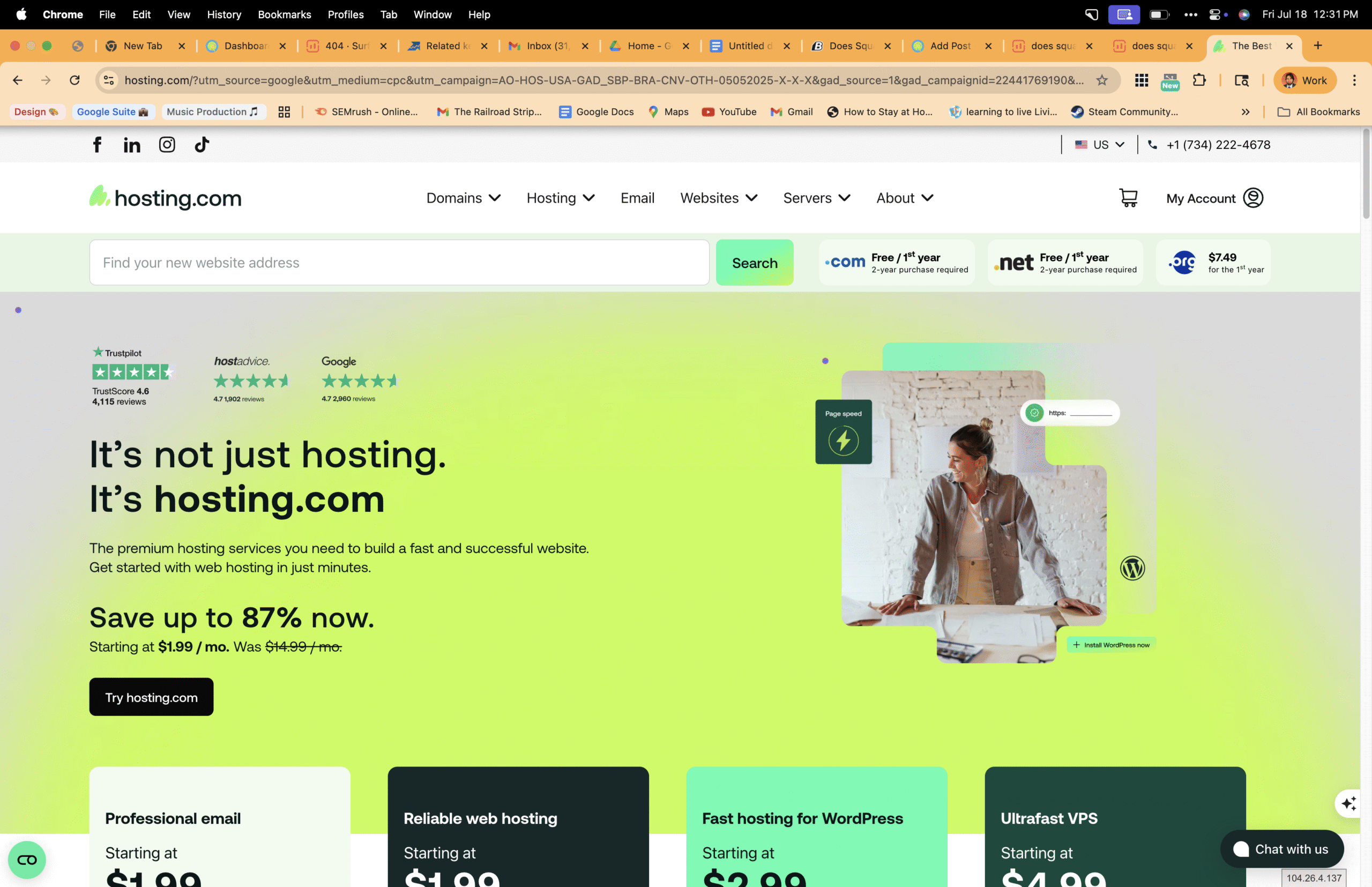
I am Ruslan Smirnov, an SEO strategist and mental health influencer; even today, I have a lot of questions about which reputable hosting companies to choose from. I started learning and advancing in custom CSS, as well as the WordPress editor. Today, I will share my story of how I started building websites and working with graphic design. At first, I thought free hosting would be the best option. Unfortunately, I don't know how complicated running a WordPress website is, as most people assume Squarespace runs on WordPress, but that's not the case. If you're creating a mental health website, picking the right platform shapes your reach and impact. Here's my journey, the Ruslan Smirnov story, and Memorable Design reveal the real differences in Squarespace vs WordPress for mental health website design—and what it means for your work.
Choosing a Squarespace domain:
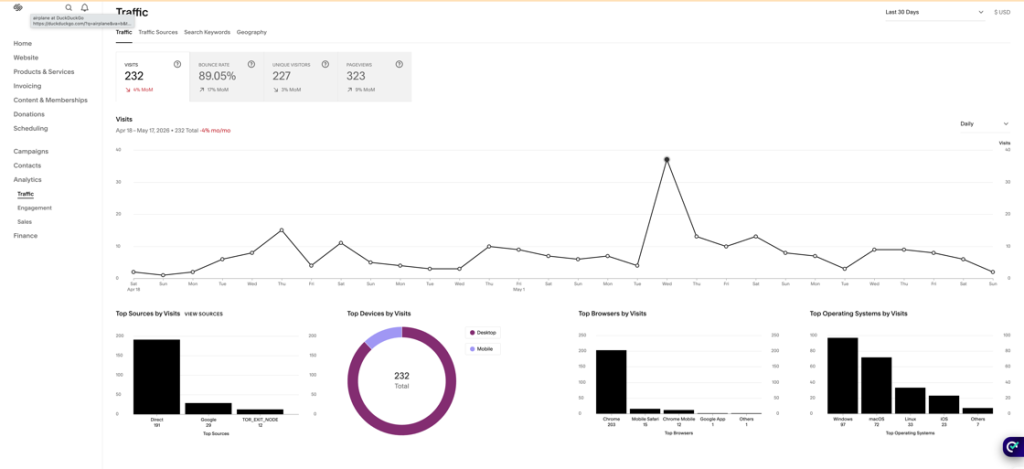
I remember how I started building my first Squarespace website and what that process felt like. At the time, I was learning how to use a self-hosted platform, and everything was new, from setting up pages to choosing the right domain name. After some thought, I decided on the name creativity4acmeart because it felt personal and connected to what I wanted to share. This step mattered to me, as it was part of shaping my online identity. I had already moved over from Wix, where I previously used a domain called remindable.biz, so choosing a new name also marked a fresh start and a new direction for my website. When I first started learning about the Squarespace editor, I was exploring how the platform worked and getting familiar with its basic tools and layout options. I was trying to build a simple portfolio website that would bring everything together in one place, include links to my social media accounts, and clearly showcase my work.
My first Squarespace site
When I first started exploring WordPress and Squarespace, I began by asking about search engine optimization customization options. I didn't have a clue what set them apart—I was just eager to dive in! I jumped in headfirst, pondering questions like, "How do they make building a website easier?" or "What makes each one unique?" I was intrigued by how their tools worked, why people favored one platform over another, and what kind of journey awaited a newbie like me. The deeper I dived, the more fascinated I became by how their unique features influenced the website-building adventure from the first time I was introduced to the system by asking: Does Squarespace use WordPress? It was all about bravely discovering the answers on my own, without any real expectations of what WordPress or Squarespace could deliver. Many people mix up Squarespace and WordPress, thinking they operate the same way or even that Squarespace uses WordPress behind the scenes. If you're choosing between these website-building platforms, this confusion can slow you down
Let's dispel the most common myths and highlight what makes Squarespace's features shine compared to WordPress's advantages, so you can choose what best suits your needs. Hey buddy, remember when the Squarespace dashboard was super straightforward? It's wild how it's transformed over time, right? We weren’t anticipating all the cool, advanced tools and features springing up so frequently back then. And wow, those AI tools? They're everywhere now, like they've always been part of our routine. It's a big nudge on how fast things can change, even when we least expect it!
Jumping into it, I quickly realized how sleek and user-friendly the layout was, making it a breeze to experiment with different design options without feeling swamped. The advanced functionality of SiteBuilder really caught my eye, especially how neatly everything is laid out, letting you tweak fonts, colors, and layouts at the drop of a hat. And hey, how do I connect my site to Google Analytics? A walk in the park—just a few simple steps and zero need for any tech wizardry. If you opt for the business plan perks, these features get even snazzier, giving you more control and nifty insights as your website blossoms.
Compare mobile editing design:
Remember how I set up the first Squarespace account, spending time learning the editor on my phone and getting used to its mobile design tools. At the beginning, everything felt simple and guided, which made it easier to move sections around and see quick visual results. However, it was only later, when I became a WordPress user and experienced its mobile editing approach, that I truly understood why I fell in love with this website platform. With WordPress, I began to notice more flexibility and control, even on mobile, and that deeper level of customization helped me see my site not just as a template, but as something I could shape and grow over time.
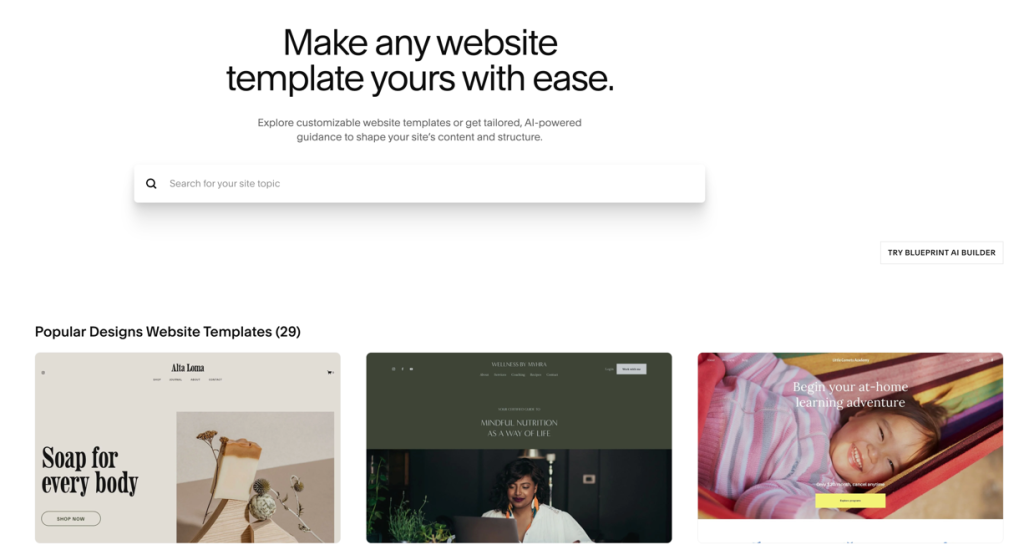
Compared to the Squarespace editor and a WordPress theme, I began designing websites by using free templates, learning how each platform guided the process in its own way. This early experience helped me understand how layouts, sections, and styles could be adjusted while still working within a ready-made design.
What squarespace template to use for my Remindable Studio Portfolio?
I am currently exploring the available options and trying to determine which template would best showcase my work in a clean, creative, and professional way. Since this is a portfolio, I want something that highlights visuals, is flexible, and lets my projects stand out without feeling cluttered or overwhelming.
When I first started using this content management system, I never imagined that in just a few years the platform would change so dramatically. Back then, templates felt more fixed and limited, and customization options were much more basic. Now, with the introduction of the Squarespace blueprint, I can design a site in a far more flexible and intentional way. It feels less like choosing a rigid template and more like building a site that truly fits my studio’s identity, which is both exciting and inspiring.
Exploring Website Design customization options
Choosing the right platform for your mental health website isn't just about looks. The foundation you build on affects how you connect with people who need your help. Let's break down what you need to know before making this important choice. Ever thought about how you can jazz up a website with a personal touch?
Both Squarespace and WordPress come with snazzy SEO tools and website builders that let you tweak everything from fonts, colors, to layouts. It’s like a playground for design enthusiasts! You can fiddle around, test out different styles, and find the perfect vibe that screams "you" for your brand.
Comparing Squarespace and WordPress
No, Squarespace does not use WordPress—they're completely separate platforms with different approaches to website creation. Right now, WordPress is much more of a blogging platform, where you can install plugins and build business websites. Squarespace is an all-in-one solution that includes everything in a single package. You pay one fee and get hosting, design tools, and support bundled together.
WordPress works differently. It's an open-source platform that can be installed on any hosting service. This gives you more freedom but also means you're responsible for putting all the pieces together. Think of Squarespace as a furnished apartment and WordPress as building your own house from the ground up.
My work with mental health professionals has shown that this distinction matters more than you might think. When you're focused on creating safe spaces online, the technical details can either free you to focus on content or become a constant distraction.
I jumped into my Squarespace site adventure by crafting a portfolio site, carefully crafting content, thoughtfully organizing each page, and designing materials that reflect who I am and what I do, along with highlights of my work.
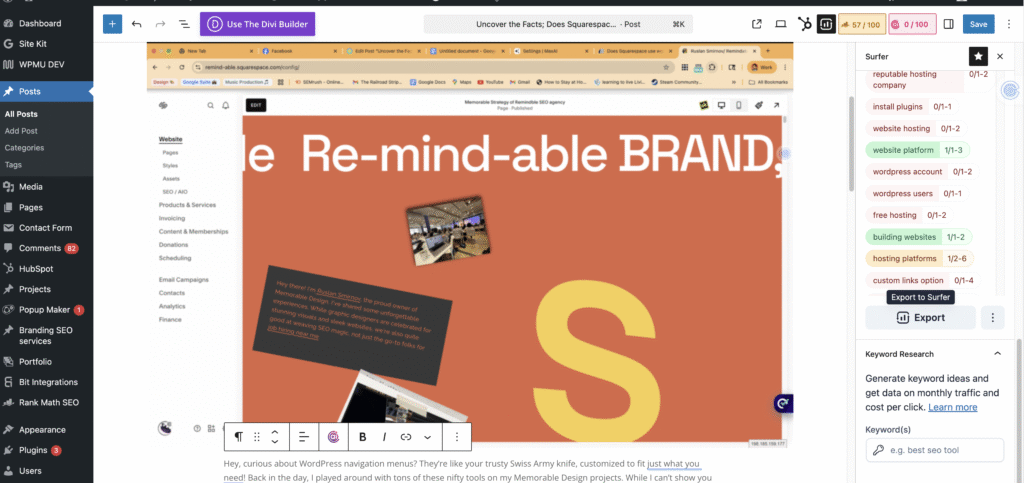
When you set up your first WordPress account, even choosing an SEO plugin can be quite complicated for everyone involved. For example, I use RankMath Pro and SurferSEO.
Hey friend, remember that first blog post about Squarespace? We were all about guiding you through picking the right website platform—Squarespace or WordPress? It was like finding your favorite ice cream flavor by taste!
Key Differences in Features
The feature sets of these platforms create very different working experiences. WordPress offers over 59,000 plugins that can add almost any function to your site. Want appointment booking? There's a plugin. Need secure patient forms? Another plugin. This flexibility comes with a learning curve—you'll need to research, install, and sometimes troubleshoot these tools.
Squarespace provides fewer options but makes them work together smoothly. Their built-in features cover most needs for mental health websites: contact forms, appointment scheduling, and blog posting tools that work right out of the box. No hunting for plugins or worrying if they'll break after updates.
For mental health content creators, this difference often boils down to a simple question: Do you want more time to create content or to manage website technology? Thinking about how you like to spend your time might just lead you to the perfect platform choice between Squarespace and WordPress. Both have their merits! Do you find joy in writing, recording, or engaging with your audience? Or are you the type who loves tweaking and perfecting the technical aspects and design? Figuring out which camp you belong to can really clarify your decision.
So, are you leaning toward a platform yet? Both Squarespace and WordPress have their charms, and it really comes down to what vibes with your style. Squarespace is perfect if you’re looking for a super easy, smooth ride to get online quickly without diving into the tech pool. On the flip side, WordPress is your jam if you love tinkering and adding those custom touches as you grow. Take a moment to think about what feels right for you—that’s the key to finding the perfect fit!
What website platform should you choose if both Squarespace and WordPress have some benefits?
Jumping into Squarespace or WordPress might feel like stepping into a cluttered attic—there are tools all over, and you might wonder where to start. It's totally normal to feel a bit dazed with all those choices and features. But just like picking up an entertaining new hobby, a little patience and effort will soon have you zipping through these platforms like a pro. They may seem daunting initially, but diving into their depths will uncover their secrets and boost your confidence before you know it!
Hey there, let's dive into WordPress for a moment. Some developers absolutely love it because it's like your own creative playground—flexible, open-source, and self-hosted. Imagine building your dream house with countless possibilities as you explore thousands of themes and plugins for ultimate control and scalability. Now, if you're venturing into WordPress.org, think of yourself as the head chef—choosing your own hosting, seasoning it with security measures, and customizing features to your taste. But keep in mind that with great flexibility comes a few to-dos—you'll need to manage hosting options, keep everything up to date, secure your site, and select standout plugins. Alternatively, if you'd prefer to skip the tech details and embrace a smoother, all-in-one journey, many developers might nudge you toward Squarespace or a similar website builder.
User Experience: What to Expect
When you build on Squarespace, expect a smooth start with some creative limits. The drag-and-drop editor makes design simple—you can create a professional-looking site in hours, not days. But you'll sometimes hit walls when you want to customize beyond what templates allow.
WordPress begins with a steeper climb but offers no ceiling on what you can create. The first week might feel frustrating as you learn the dashboard, choose themes, and set up plugins. But months later, you'll appreciate the freedom to build exactly what you envision for your mental health practice.
I've seen therapists struggle with WordPress updates that broke their sites. I've also watched counselors feel trapped by Squarespace limitations when their practices grew. The best choice depends on your comfort with technology and your long-term goals. Be honest about both when deciding.
Are they the Same Thing?
Nope, Squarespace and WordPress aren’t linked at all. It’s a common misconception swirling around online. They’re actually two distinct website-building platforms, each crafted by separate companies with their own unique spin.
Imagine Squarespace like ordering a meal kit—all you need is there, ready to be warmed up and enjoyed! It's an all-inclusive platform, wrapping up hosting, security, templates, and support neatly under one fee.
WordPress is like a recipe that you get for free! You'll need to find just the right hosting service, choose themes (which might cost you a bit), and keep everything safe and sound with security updates. It’s a bit of extra effort, but you get the freedom to mix things up and make it uniquely yours.
Many website owners end up confused by misinformation. Take, for instance, the small business owner I chatted with last week who mistakenly believed Squarespace was "just a prettier WordPress." This mix-up left him tangled in decision paralysis for quite some time!
Tailoring for Mental Health Needs
Website platforms aren't one-size-fits-all, especially for mental health services. The right choice supports your mission to help others through their challenges..
Compare Squarespace and WordPress:
Ever puzzled over how WordPress makes menu magic happen, just for you? Back in my Memorable Design days, I played around with cool tools like "WP Mega Menu" and "Responsive Menu" plugins—they were my secret sauce for creating sleek, savvy navigation for businesses. Meanwhile, Squarespace dances to its own beat with straightforward navigation editors built right in—perfect for setting up portfolios or online shops without needing extra add-ons, though with WordPress, you'll need plugins and hosting in the mix.

How Each Platform Operates
Imagine Squarespace as your friendly assistant who takes care of everything behind the scenes. You pop into their system, choose a design that suits your style, and customize to your heart's content within their cozy framework.
Building with Squarespace is a bit like renting a comfy spot in their digital neighborhood. They handle all the techy stuff—keeping your site secure, managing servers, and ensuring everything runs smoothly. It's a stress-free zone, though it means you give up a bit of control over the nitty-gritty details.
On the flip side, WordPress is like your DIY project. The software is free, but you get to choose where your site lives by setting up your own hosting. Once it's all set up, you can dive into themes, plugins, and endless customization.
With WordPress, you're the captain of your ship. You can switch hosts for better deals, pick any theme or plugin, and even dabble in custom code. But remember, with this creative liberty comes the responsibility to keep everything shipshape, secure, and updated.
Hey there, ever curious about WordPress navigation menus? Think of them as your handy Swiss Army knife, tailor-made to suit whatever you need! Back in my Memorable Design days, I fiddled around with loads of these cool tools. While I can’t share the exact sites now, imagine "WP Mega Menu" or "Responsive Menu" plugins. They’re secret weapons for making business and news site navigation slick and efficient. Meanwhile, Squarespace offers its own flair with easy-to-use, built-in navigation editors—just the ticket for creating stunning portfolios or setting up an online store without extra bells and whistles.
Ever feel like diving into website building is a wild adventure? Let's explore it together—WordPress and Squarespace each bring their own flavor. Picture WordPress as your artsy, free-spirited buddy—it’s open-source and invites you to experiment with plugins and themes without emptying your wallet. If you love being the master of your domain, both platforms offer great ways to keep you in control and ready to expand. Now, envision Squarespace as your dependable companion for a seamless, all-in-one journey with its user-friendly templates and built-in features. Perfect for those craving an effortless experience. Your decision really hinges on your needs and comfort with tech—just remember, nothing comes for free!
Hey, ever find yourself puzzled trying to choose the right hosting service for WordPress? It's like shopping for shoes—so many styles and sizes with different price tags! And don't even get me started on plugins—it's like being a kid in a candy store, not knowing which treat to pick. Whether you’re launching a personal blog or going big with a business site, it might feel like a bit of a puzzle at first. But no worries; I'm here to help you piece it all together smoothly!
At a glance, these platforms might seem pretty similar. But here's the thing—Squarespace and WordPress are completely separate—Squarespace doesn’t operate on WordPress at all.
Content That Resonates
Hey friend, when you're crafting your mental health site, those words, images, and videos need to hit home with a personal touch. WordPress is like your creative playground here, letting you experiment with flexible layouts for different tales and resources. Fancy a special section for testimonials or want to share research findings and coping strategies? You can tweak it all to suit your style!
Squarespace offers stunning templates that help your content look polished with just a bit of effort. Their strength lies in handling images, enabling you to weave visual stories that convey hope and healing. The downside? Fewer ways to organize and link related content.
What matters most is that your platform doesn't get in the way of your message. Test both systems with your actual content before deciding. See which one lets your voice come through most clearly to the people who need to hear it.
Ruslan Smirnov's and my Inspiring Journey
Ever wonder how my journey with website platforms began, even before diving into helping mental health professionals? Picture this: having the right tools can be a game-changer, especially when you're out there aiming to make a splash for small business owners. It's all about presenting ideas that pop and resonate clearly and professionally.
Reliable tools save the clock's precious ticks (and tocks!), giving you that boost to focus on the true goal: supporting dreams and making voices heard. Remember when I first stumbled across Squarespace? It was like discovering a toolkit of polished templates that turned basic notions into refined realities. That pivotal experience? It really drove home how the perfect platform clarifies your message, making the result both personal and professional. Oh, the magic of small steps, right? You know, I was really blown away by how adaptable and user-friendly those Squarespace templates are, especially on this fantastic platform. The way you can tweak each design to fit your vision makes it feel like a smooth, personal journey while still delivering that sleek and professional finish.
Ruslan Smirnov's and my Inspiring Journey
Ever wonder how my journey with website platforms began, even before diving into helping mental health professionals? Picture this: having the right tools can be a game-changer, especially when you're out there aiming to make a splash for small business owners. It's all about presenting ideas that pop and resonate clearly and professionally. Reliable tools save the clock's precious ticks (and tocks!), giving you that boost to focus on the true goal: supporting dreams and making voices heard. Remember when I first stumbled across Squarespace? It was like discovering a toolkit of polished templates that turned basic notions into refined realities. That pivotal experience? It really drove home how the perfect platform clarifies your message, making the result both personal and professional. Oh, the magic of small steps, right? You know, I was really blown away by how adaptable and user-friendly those Squarespace templates are, especially on this fantastic platform. The way you can tweak each design to fit your vision makes it feel like a smooth, personal journey while still delivering that sleek and professional finish.
Overcoming Challenges with Brain Injury
My world changed when I experienced a traumatic brain injury. Simple tasks became mountains to climb, and technology that once felt natural now seemed foreign. This struggle gave me unique insight into how websites should work for people facing challenges.
The injury forced me to relearn digital skills from scratch. Each day brought small victories and frustrating setbacks. I found that some platforms added to my cognitive load with complex menus and settings, while others provided clear paths forward.
This experience taught me that mental health websites need simplicity at their core. When someone visits your site during a personal crisis, every extra click or confusing navigation choice creates a barrier to getting help. My recovery journey made me passionate about removing these barriers through thoughtful design.
Thinking about going with WordPress or choosing a Squarespace plan for your website journey?
Hey, have you ever wondered what e-commerce features Squarespace brings to the table compared to WordPress? And how do their tools differ when it comes to building your dream online store? Let's dive in and explore!
What options of Squarespace pricing do you have, or why I recommend WordPress for search engine optimization for small business owners?
Now, let's chat about WordPress. If you're a small business buddy looking to make a splash on search engines, WordPress might be your BFF. Why?
They’re like two friendly distant cousins in the website world, WordPress and Squarespace!
Picture WordPress as that fixer-upper project that invites you to roll up your sleeves and get creative. You'll need to sort out the hosting and setup, but the potential is as vast as your imagination. Now, on the other hand, think of Squarespace like a cozy blanket, wrapping everything you need into one simple package, a bit like those nifty tools Elementor or DIVI. Both will help you create stunning websites; they just have their own unique vibes and spins in the web design and management game.
Ever wondered if installing WordPress is a breeze, or how to pick the perfect web hosting?
Hey there, ever find yourself musing about how simple it might be to get WordPress up and running? It's absolutely within reach, especially if you choose a host offering one-click installations—many leading providers have this handy feature tailored for beginners. But if you're feeling a bit adventurous and crave a touch more control, you can grab WordPress from wordpress.org and manually set it up on your hosting server by uploading files and creating a database.
Ever felt like picking the right WordPress hosting is a bit like standing in front of an ice cream parlor with too many flavors? I dived wp.com only to realize it wasn't quite my flavor. It’s crucial to understand that WordPress.com offers less wiggle room for personalization compared to the self-hosted path with WordPress.org. With WordPress.org, you step into a creative playground with full reign over themes and plugins. To avoid the limitations of WordPress.com, take some time to research hosting platforms. Look for those stars in reliability, speed, customer support, security, scalability, and easy use. Finding that perfect match will feel like a sweet victory, setting you on a path aligned with your ambitions and that savvy tech attitude!
Lessons Learned in Digital Consulting
Working with mental health content creators taught me that website platforms must grow with you. Many start with big dreams but limited budgets and technical skills. The right choice supports your current reality while leaving room for future growth.
I've watched clients outgrow Squarespace as their practices expanded into multiple locations or specialized services. I've also seen WordPress overwhelm new practitioners who needed to focus on building their client base, not learning website code.
The most successful mental health websites come from matching the platform to the person. Your comfort with technology, available time for website management, and specific service needs should drive this decision. There's no universal "best" platform—only the best fit for your unique situation.
Enhancing SEO for Mental Health Sites
People seeking mental health support often start with search engines. Making your site visible to those who need it most requires strategic thinking about SEO.
SEO Strategies for Better Reach
Search visibility works differently on each platform. WordPress gives you complete control over SEO through plugins like Yoast or Rank Math. You can customize every meta description, URL, and keyword focus. This control helps target specific mental health terms your audience is searching for.
Squarespace builds basic SEO features into every site. You can edit titles, descriptions, and URLs without plugins. Their structured approach helps prevent common SEO mistakes but offers fewer advanced options for keyword research and tracking.
What matters most is creating content that answers real questions people have about mental health. Both platforms can support this goal, but WordPress provides more detailed SEO tools if you're ready to use them. For SEO strategies specific to web designers, check out my specialized guide.
Engaging Mental Health Content Creators
Content creators in the mental health space face unique challenges. You're balancing professional boundaries, ethical considerations, and the need to connect authentically. Your website platform should make content creation easier, not harder.
WordPress offers a more robust blogging system with features like content scheduling, multiple authors with different permission levels, and extensive formatting options. These tools help when you're creating in-depth resources or managing a team of writers.
Squarespace provides a simpler blogging experience that works well for individual practitioners. Their image handling and layout tools make visual content shine without technical knowledge. For many mental health professionals, this simplicity means more time helping people and less time fighting with technology.
The best platform supports your content creation style. Do you write long, research-backed articles? WordPress might serve you better. Prefer sharing visual stories and brief insights? Squarespace could be your perfect match.
Tools and Tips for Effective Branding
Your mental health brand communicates trust before clients ever speak with you. Both platforms offer branding tools, but they work differently. WordPress requires you to build your brand elements piece by piece, often using themes and plugins to create a cohesive look.
Squarespace excels at consistent branding with built-in color palettes, font pairings, and design elements that work together automatically. This can help mental health providers create professional brands without hiring designers.
For deeper insights into creating memorable brands, watch my YouTube presentation on digital marketing strategies. The principles apply regardless of which platform you choose, but knowing the tools available on each helps you implement them effectively.
Making the Right Choice for Your Site
The final decision comes down to your specific situation and goals. Let's look at practical considerations that will help you choose wisely.
Assessing Your Unique Needs
Start by listing what your mental health website absolutely must do. Do you need online scheduling? Patient portals? Blog capabilities? Video resources? Membership areas? Some features come standard on one platform but require add-ons on the other.
Consider your technical comfort level honestly. WordPress offers more power but demands more learning. Squarespace provides less flexibility but greater ease of use. Neither advantage matters if it doesn't match your skills and available time.
Don't forget to factor in growth plans. If you're starting a solo practice but dream of building a multi-provider clinic, you'll need a platform that grows with you. Sometimes the right choice isn't what's easiest today, but what supports your vision for tomorrow.
Balancing Cost and Functionality
WordPress itself is free, but you'll pay for hosting ($5-30 monthly), themes ($0-100), and plugins ($0-200+ yearly). These costs scale with your needs, making WordPress potentially cheaper for basic sites but more expensive for complex ones.
Squarespace packages start around $16 monthly with everything included. This predictable pricing helps with budgeting, though you might pay for features you never use. For many mental health startups, this all-in-one approach simplifies financial planning.
The hidden cost factor is your time. WordPress typically requires more hours for setup and maintenance. If you bill clients at $100/hour, spending even 2 extra hours monthly on website tasks costs you $2,400 yearly. This opportunity cost often outweighs the direct platform expenses.
Future-Proofing Your Website Design
The mental health field evolves rapidly, and your website needs to keep pace. WordPress offers better long-term flexibility because you own and control all your content and can move it to different hosts or even different systems if needed.
Squarespace provides regular updates and new features without requiring your input. This automatic modernization keeps your site current with less effort on your part. The trade-off is less control over when and how changes happen.
The most future-proof approach combines platform strengths with solid planning. Choose the system that matches your technical abilities and business goals, but always keep your content backed up and your brand assets organized. This preparation allows you to pivot platforms if needed without starting from scratch.
Remember that the best mental health websites focus on helping people first and technology second. The platform that lets you do that most effectively is the right one for you.
Building Memorable Design
After my injury, I founded Memorable Design with a clear purpose: to create websites that stick in people's minds while being easy to use. This balance is especially important for mental health services, where both emotional connection and practical function matter.
I discovered that the platform choice affects how memorable a site becomes. WordPress allows for unique, custom designs that stand out, but requires more technical skill. Squarespace delivers polished results quickly, though sometimes these sites can look similar to others.
My approach now combines the strengths of each platform based on the client's needs. For some mental health professionals, I recommend the Squarespace Circle experience because it lets them focus on helping people rather than website maintenance. For others with specific technical needs, WordPress provides the right foundation for growth.
Ever felt like navigating WordPress hosting is a bit like choosing ice cream flavors with too many options? I jumped straight into wp.com and realized it wasn't quite the right choice. It’s key to know that WordPress.com offers less room for personalization than going the self-hosted route with WordPress.org. With WordPress.org, you get a playground to unleash your creativity, with complete control over themes and plugins. To sidestep the confines of WordPress.com, dive into research on hosting platforms. Look for those standouts in reliability, speed, customer support, security, scalability, and user-friendliness. Finding that perfect match will feel like a win, setting you on a path that suits your ambitions and tech-savvy swagger!
Having this one-click installation feature is like having an express pass to the WordPress world, saving you time and reducing the margin for error. It’s especially beneficial if you’re new to the game, allowing you to focus more on building your site rather than getting bogged down in technical configurations.
But what about picking the perfect hosting provider? Here’s the lowdown:
- Reliability and Uptime: Look for a host with at least a 99.9% uptime guarantee. The last thing you want is for your site to be down when visitors try to access it.
- Speed: Page loading speed is crucial. A slow site can deter visitors and negatively affect your SEO. Consider hosts with optimized server setups and Content Delivery Networks (CDNs) to boost speed.
- Customer Support: Opt for providers that offer 24/7 support via multiple channels like live chat, phone, or email. Quick, reliable support can make all the difference when encountering issues.
- Security Features: Prioritize providers offering SSL certificates, regular backups, and malware scanning. Security is paramount, especially if you handle sensitive or personal data.
- Scalability: As your site grows, your hosting needs will change. Look for providers that offer scalable solutions, allowing you to upgrade your plan seamlessly as your traffic increases.
- Ease of Use: User-friendly interfaces with dashboards and management tools make the hosting experience much smoother—essential if you’re less tech-savvy or new to website management.
Ultimately, the perfect host depends on your specific needs—whether you’re looking for affordability, power, or ease of use, there’s a match out there for you. It’s all about finding the sweet spot that aligns with your website’s goals.
