
Key Takeaways
- Simple guide to mastering core web vitals for beginners
- Easy fixes to boost page speed SEO and user experience
- Up-to-date breakdown of LCP, CLS, and INP metrics
- Actionable core web vitals checklist for faster loading
AI Overview
Core web vitals are a set of specific metrics defined by Google to measure user experience on a webpage. They focus on loading speed, interactivity, and visual stability. Optimizing core web vitals improves your page speed SEO and keeps visitors happy on both desktop and mobile devices. By improving these scores, you boost website performance SEO and help your pages rank higher in Google search results based on available data.
1. What Are Core Web Vitals and Why Do They Matter?
Have you ever tapped a link on your phone, waited forever for it to open, and then tapped the back button out of frustration? We have all been there, and so have your website visitors! Core web vitals are Google's way of measuring how real people experience the speed and stability of your webpage. In plain words, if your site loads slowly or shifts around while loading, users leave.
That directly impacts your overall website performance SEO and search rankings. Google wants to show searchers websites that feel snappy, smooth, and painless to navigate. When you optimize these core metrics, you do not just please search engines you build a website that visitors love using everyday. At memorabledesign.com, we generally see that fixing these performance signals leads to better user engagement and higher conversions in most cases.

2. Breaking Down the Core Metrics: LCP, CLS, and INP
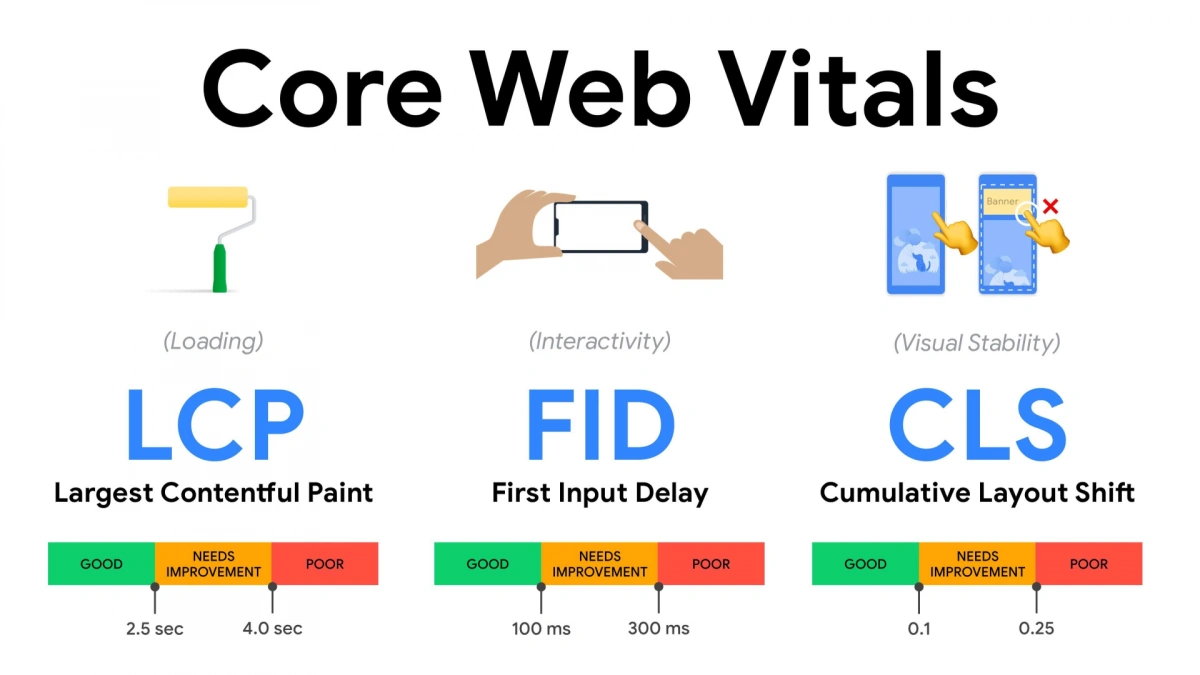
To fix your performance, you need to know what you are actually measuring. Google looks closely at three main user experience pillars to score your website. Let us look at each metric in plain, friendly language so you know exactly what is going on behind the scenes.
| Metric Name | Full Form | What It Measures | Ideal Target Score |
| LCP | Largest Contentful Paint | Loading Speed (Main Content) | Under 2.5 seconds |
| INP | Interaction to Next Paint | Overall Responsiveness | Under 200 milliseconds |
| CLS | Cumulative Layout Shift | Visual Stability | Score under 0.1 |
Largest Contentful Paint (LCP)
LCP measures how fast the main content of your webpage loads on screen. This could be a large image, a hero banner, or a big block of heading text. If your main image takes five seconds to appear, your LCP score drops, hurtling your overall page speed SEO results.
Interaction to Next Paint (INP)
INP replaced the old FID (First Input Delay) metric to better measure full-page responsiveness. It tracks how quickly your site reacts when a visitor clicks a button, taps a link, or opens a menu. A great INP score ensures that your site never feels sluggish or frozen when someone tries to interact with it.
Cumulative Layout Shift (CLS)
Have you ever tried to click a button, but the page suddenly jumped, making you tap an ad by mistake? That frustrating jump is measured by Cumulative Layout Shift (CLS). Keeping elements stable while loading improves your mobile page speed experience and prevents visitors from bouncing away.
3. How to Measure Your Scores with Pagespeed Insights
How do you check where your site stands right now? The simplest way is to use free testing tools like Pagespeed Insights provided directly by Google. Just enter your URL, hit analyze, and wait a few seconds for a full breakdown. Pagespeed Insights gives you two types of data: real-world user data (Field Data) and simulated lab tests (Lab Data).
Field data shows how real human visitors experience your core web vitals over the last 28 days. Lab data gives you an immediate technical diagnostic to help you debug layout shifts or script delays right away. Checking your site regularly on Pagespeed Insights helps you spot performance drop-offs before they hurt your organic search rankings.
4. Practical Ways to Improve Mobile Page Speed
Most web traffic today happens on smartphones and small screens. Because mobile devices often rely on slower cellular networks, mobile page speed requires extra care and attention. If your mobile pages take too long to load, users leave before reading a single line. Optimizing images is usually the fastest win for mobile performance. Compression tools can reduce image file sizes by up to 80 percent without losing visible visual quality.
Also, consider using modern image formats like WebP or AVIF instead of heavy JPEGs or PNGs. Another critical step is cleaning up heavy JavaScript files that block rendering. Unused code delays how quickly the screen displays your content, dragging down your core web vitals metrics. Minifying CSS and delaying non-essential scripts keeps your mobile loading times lightning-fast.
5. The Complete Core Web Vitals Checklist
Ready to speed up your site? Here is a simple core web vitals checklist you can follow step-by-step.
Optimization Action Items
- Optimize Images: Convert images to WebP format, compress large files, and set exact dimensions (width and height) to stop visual layout shifts.
- Upgrade Web Hosting: Switch to a fast, reliable hosting provider or use a Content Delivery Network (CDN) to serve assets quickly.
- Minify Code: Remove unused CSS, delay heavy JavaScript scripts, and inline critical CSS needed for top-of-page rendering.
- Enable Browser Caching: Store static assets in visitors' browser cache so repeat visits load instantly.
- Fix Web Fonts: Use
font-display: swapin your CSS so text remains visible while custom web fonts download.
Following this core web vitals checklist ensures your pages load smoothly and pass Google's user experience tests with ease. At memorabledesign.com, following these practical steps generally allows us to double page loading speeds for client websites based on available data.
6. How Page Speed SEO Impacts Search Rankings
Does page speed SEO really change where your website ranks on Google? Yes, but it works alongside great content, strong backlinks, and clear site structure. Core web vitals act as a ranking factor, especially when choosing between two pages with equally great content quality. If two articles give the exact same answer, Google will prioritize the one that offers a faster, cleaner user experience.
Good page speed SEO reduces bounce rates, keeps readers on your page longer, and increases page views per session. When search engines notice people staying on your site and enjoying the experience, they naturally reward you with better visibility. Investing time into website performance SEO builds a solid foundation for all your digital marketing efforts.
7. Common Fixes for LCP, CLS, and INP Issues
Let us troubleshoot some of the most frequent technical errors site owners run into when optimizing core web vitals.
Fixing LCP Issues
Large hero images or unoptimized background banners are the usual culprits behind poor LCP scores. Preload your main hero image using link preloading tag headers in your HTML. Avoid lazy loading images that appear "above the fold" or at the top of the browser screen.
Fixing CLS Issues
Layout shifts happen when images, ads, or embeds do not have pre-allocated dimensions in CSS. Always declare explicit width and height attributes on image tags and iframe containers. This reserves the exact space needed on screen before the asset fully downloads, keeping the page stable.
Fixing INP Issues
High INP scores are typically caused by heavy JavaScript running in the browser's main thread. Break up long JavaScript tasks into smaller, asynchronous scripts that do not freeze the browser window. Remove heavy, redundant plugins that slow down mobile page speed and responsiveness.
8. Essential Tools for Website Performance SEO
You do not need to guess how well your website performs when you have the right tools. Here is a simple comparison of popular tools you can use to audit your core web vitals and overall site health.
| Tool Name | Best Used For | Key Feature | Cost |
| Pagespeed Insights | Fast diagnostic checks | Lab and real-user Field data directly from Google | Free |
| Google Search Console | Site-wide monitoring | Identifies grouped URL errors across your entire domain | Free |
| GTmetrix | In-depth waterfall charts | Detailed loading sequence and script breakdown | Free & Paid |
| Lighthouse | Local developer testing | Chrome browser extension for instant lab audits | Free |
Using a combination of Search Console and Pagespeed Insights gives you full visibility into your website performance SEO progress. Tracking these metrics monthly ensures your mobile page speed stays top-notch as you add new content. If technical setup feels overwhelming, working with a team like memorabledesign.com can streamline the entire process for you.
Conclusion
Improving your core web vitals is one of the smartest moves you can make for your site's search visibility and visitor experience. When you focus on fast loading times, quick responsiveness, and stable layouts, everyone wins.
By following this core web vitals checklist, optimizing your mobile page speed, and keeping an eye on Pagespeed Insights, you lay a strong foundation for long-term page speed SEO success. Take it one small fix at a time, test your changes, and watch your website performance SEO reach new heights naturally!
9. Frequently Asked Questions (FAQs)
What are Core Web Vitals in SEO?
Core Web Vitals are Google metrics measuring page loading speed, visual stability, and interactivity to evaluate real-user experience.
How do I check my Core Web Vitals score?
You can easily check your scores using free tools like Google PageSpeed Insights or Chrome Lighthouse.
What is a good LCP score for websites?
An ideal LCP score is 2.5 seconds or faster for at least 75 percent of page visits.
Does mobile page speed affect Google rankings?
Yes, Google uses mobile-first indexing, making mobile page speed a direct ranking factor for search visibility.
How often does Google update Core Web Vitals?
Google measures data continuously over 28-day rolling periods, updating field scores gradually as user experience improves.